0422 442 029
>
How to Order 2 Or More T Shirts For Custom Printing

How to Order Two or More Shirts Online - Step by Step Guide

Same Style • Same Brand • Different Sizes

Need a few shirts for a team, family, small event or staff group?
At Custom T Shirt Printing Online, you can easily order two or more shirts for t shirt printing in the same style and brand, with different sizes, using our online ordering system.

Here we will just focus on one color as well to keep it simple. Quite often customers call as they think they need to place separate orders for their events. I shall show you how you can easily save time and money doing the order this way.

This guide walks you through the process step-by-step.

Step 1 – Visit Our Website

Go to:
👉 https://customtshirtprintingonline.com.au/

From the menu, choose:

  • T-Shirts
  • Hoodies
  • Polos
  • or the category that matches what you want to print on.

You can do a CNTRL F on the page and then type the style name and jump to each shirt. Much faster way to find what you want.

Step 2 – How To Choose Your Garment (Brand & Style)

Select the exact garment you want to use for all shirts in the order.

Popular options include:

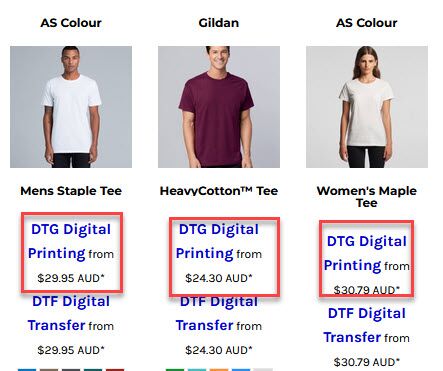
  • AS Colour Staple Tee
  • AS Colour Basic Tee
  • Gildan Softstyle Tee
  • JB’s Wear Tees & Polos
  • RAMO Hoodies
  • or the category that matches what you want to print on.

This will be the same style and brand for everyone — only the sizes will vary.

Click into the product page.

Step 3 – How To Select Colour of T-shirt

Choose the shirt colour you want for all shirts:

  • Black
  • White
  • Navy
  • Marle / Grey
  • Or any other available colour

You can usually keep the colour the same for the group, or place separate orders if you need different colours.

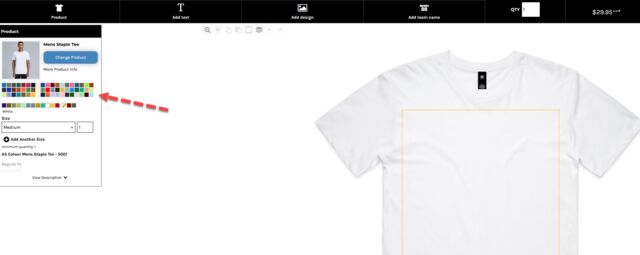
Where to select colors for t shirt printing

Step 4 – How To Select Tee Shirt Sizes (Same Style, Different Sizes)

On the product page, you’ll see size options such as:
  • XS, S, M, L, XL, 2XL, 3XL, etc.
For two or more shirts in different sizes:
  1. Choose the first size (e.g. M)
  2. Set the quantity for that size (e.g. 2 shirts in size M)
  3. Then choose the next size (e.g. L)
  4. Set the quantity for that size (e.g. 1 shirt in size L)
  5. Continue adding sizes and quantities as needed
Some systems have a size grid (e.g. a row for each size). If so:
  • Enter the number of shirts needed in each size box
    • S = 1
    • M = 2
    • L = 1
    • XL = 0
    • etc.
Your total quantity will be automatically calculated.
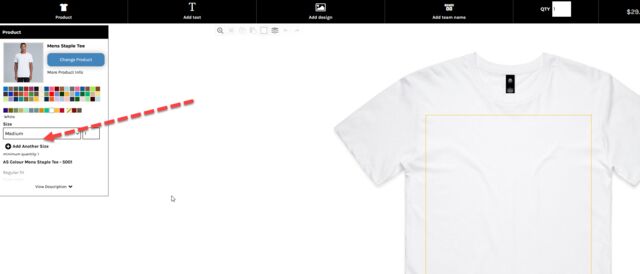
Tips to setting up a t shirt order online for sizes

Step 5 – How to “Add Design” or "Add Text" to “Start Designing”

Once you’ve chosen all sizes in that style and brand:

  • Click “Customise” or “Start Designing”
  • This opens the design tool for that one garment style

All shirts in this order will use the same design layout (unless your system supports multiple designs per order).

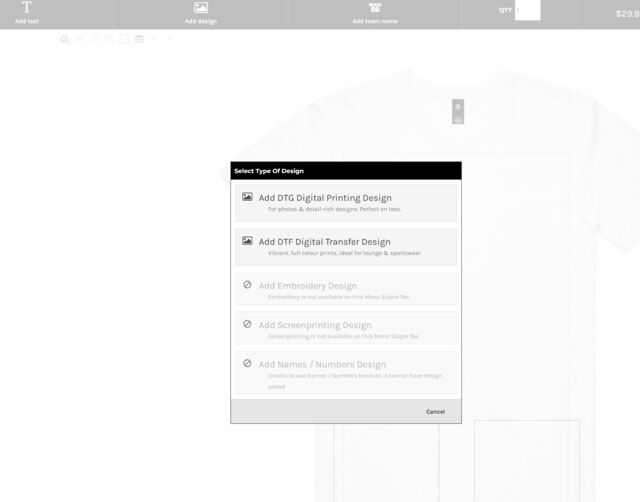
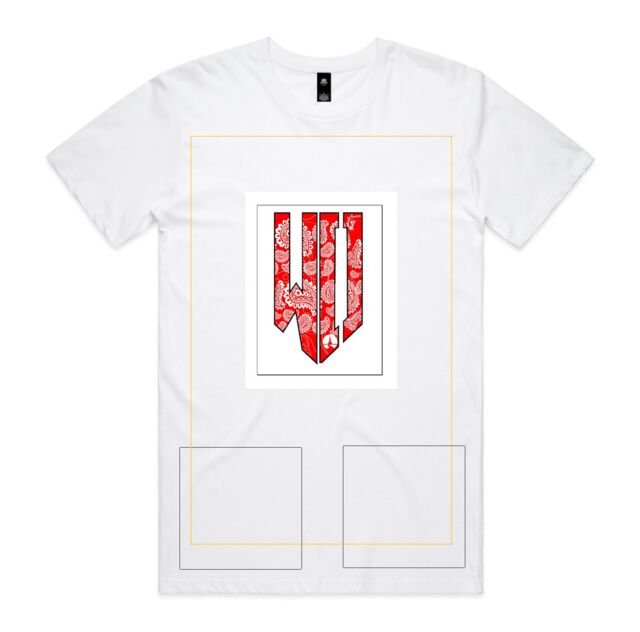
How to add Text or Photos to your order

Step 6 – How to Upload Your Design

In the design tool, upload your artwork:

  • PNG (preferred)
  • JPG
  • PDF
  • EPS

You might upload:

  • A logo
  • Event artwork
  • A slogan
  • A graphic or illustration
  • A team or business name


Place it where you want it to print:

  • Full front
  • Left chest
  • Full back
  • Or another supported placement. Some shirts allow printing on sleeves

You can resize, move and preview the print on the shirt.

👉 Important:
The design you create here will be applied across all shirts in this order (same artwork, different sizes).

Where to place images on shirts for printing

Step 7 – How to Add T Shirts to Cart

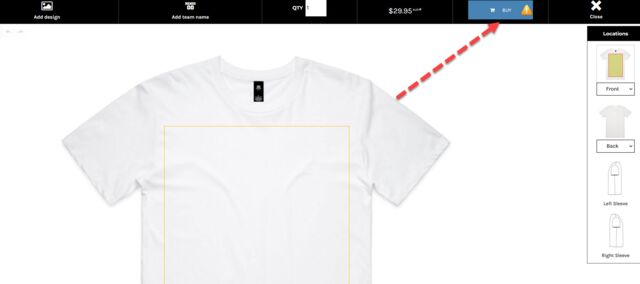
Click “Buy” to the top right of the page.

Your cart will now reflect:

  • The total number of shirts
  • The garment style
  • The colours
  • The size breakdown
  • The print method (DTG/DTF/Screen, depending on your setup)

For orders of 5 or more shirts, any bulk discounts you offer can be applied automatically at checkout or via your pricing logic.

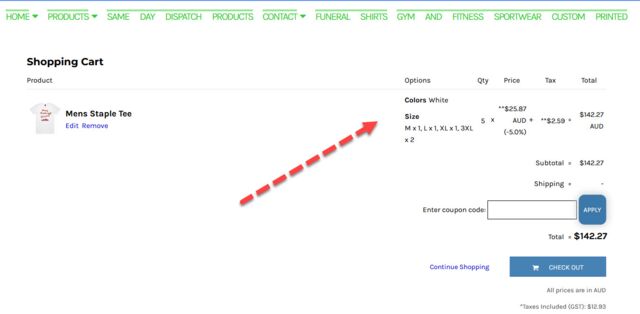
How to finalise a T shirt print order

Step 8 – How to Check Your Tee Shirt Design & Size Breakdown

  • The design position (front/back/left chest)
  • The print size (proportion to the shirt)
  • The colour and clarity of your artwork
  • The number of shirts in each size
How to check your order for t shirt printing is correct

Step 9 – Choose Shipping or Pickup For Printed T-shirts

At checkout, select how you’d like to receive your order:

Delivery

  • Express: Fastest option (ideal for urgent orders)
  • Standard: Lower cost, extra time


Pickup

If available and appropriate for this order:

  • Brisbane Pickup – 80 Bellevue Avenue, Gaythorne QLD
  • Melbourne Pickup – 20 Rose Street, Fitzroy VIC


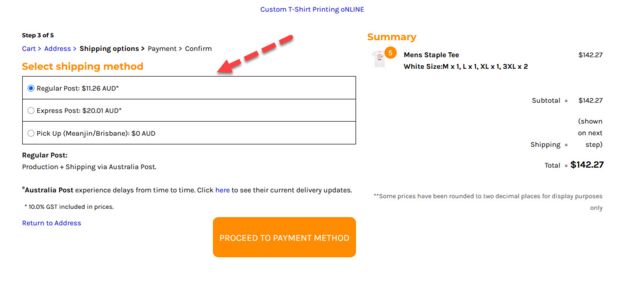
Can I get Express shipping for my t shirt order

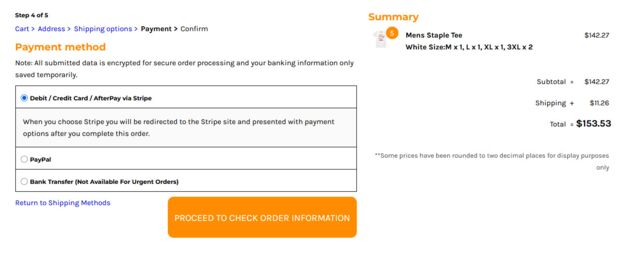
Step 10 – Confirm & Pay For T Shirts

Enter:

  • Shipping details: Name, Address with Postcode
  • Contact email
  • Payment method: Credit card, PayPal or Bank Transfer

Then confirm and pay.

Once paid:

  • Your order enters our production queue
  • Artwork is processed
  • Shirts are printed according to the style, brand and size breakdown you selected
Here you will select the payment method for your t shirts

Step 11 – Production & Dispatch Of T Shirts

We’ll then:

  • Print all shirts in your chosen style and brand
  • Use your approved artwork
  • Pack and ship them


Timeframes depend on whether you chose:

  • Express / urgent
  • Standard 2-week turnaround

You’ll receive tracking information when the order has shipped or a notification when it’s ready for pickup.

Tips for Ordering Multiple Sizes in the Same Style

  • Use the same garment style for a consistent look across all sizes
  • If unsure about sizes, check the size chart on the product page
  • For teams or staff, ask everyone for their size before placing the order
  • Ensure your artwork looks good on both small and larger sizes (we can help advise)

Need Help With a Small Group Order For T Shirt Printing?

If you’re ordering:

  • Shirts for a small team
  • A family group
  • A small event
  • A classroom or club

…and want to make sure you get everything right, you can:

  • Email us your garment choice, size breakdown and artwork
  • Or ask for help before placing the order

We are happy to walk you through the process.

Quick Links

Pricing Guide  |  Artwork Guidelines  |  Apparel Sizing Guide  |  General FAQS

How To Order Just One Shirt For Printing  |  How To Order Shirts in Different Colors Or Brands

Search
Your cart is empty
Search

Select Currency

{CC} - {CN}